Understanding Lookify Credits
Lookify credits are the currency that powers phone number lookups on the website and through the Lookify API. This article focuses on how credits apply to searches on lookify.io; for API request types and data objects, use the documentation link at the end of this page.
What are Lookify Credits?
Credits are the units used to unlock deeper data after a free preview. Each paid search type on the web costs a fixed number of credits so you can choose the depth of lookup you need.
How Credits Work
- Variable credit costs: Carrier, threat, and person lookups use different credit amounts on the web (see the table below). The free preview never spends credits; paid lookups draw from the same balance whether you search on the site or via the API.
- Monthly allocation: Starter plans include 500 credits per month, while Professional provides 4000 credits monthly. Credits are automatically refreshed on your billing date.
- Credit rollover: Unused credits from your monthly allocation do not roll over to the next billing cycle, so it's best to use them within your subscription period.
- Additional credits: If you run out of credits before your next billing cycle, you can purchase additional credit packs at any time without changing your subscription.
Credit usage by search type
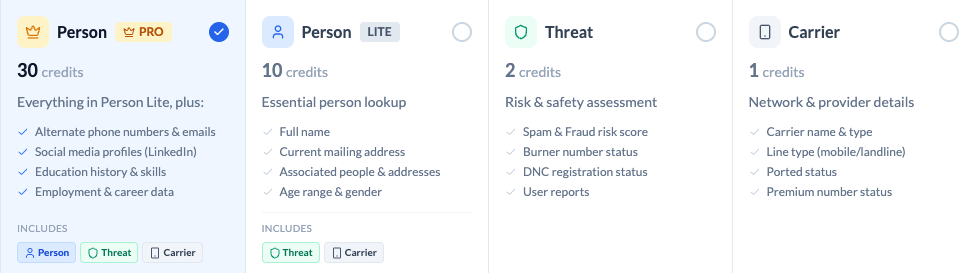
There are four search types when you want to go beyond the free preview: Carrier, Threat, Person Lite, and Person Pro. You choose the search type that fits the types of data you want to retrieve. For example, a Person Lite search will return the core identity data including full name, current mailing address, associated people and addresses, and caller type. A Threat search will return the Lookify Threat Score, including burner detection. The table below shows the credit cost and what each option usually includes.
| Search type | Credit Cost | What's included & typical fields |
|---|---|---|
Free preview | 0 | No credits are used. You see a preview of the number with formatted digits and line type, a high-level carrier and location summary, and hints about what paid sections could show. Those sections stay locked until you run a paid search. |
Carrier | 1 | Unlocks carrier data only. Person and threat sections are not included with this option.
|
Threat | 2 | Unlocks threat (risk) data only, including the threat score area of the report. Person and carrier sections are not fully unlocked beyond what the free preview already shows.
|
PersonLite | 10 | One search unlocks the Person (Lite), Carrier, and Threat sections together. You get core identity and address data plus carrier and threat detail comparable to running standalone Carrier and Threat searches for the same number, in a single bundled lookup.
|
PersonPro | 30 | This is the full stack for the number: everything in Person Lite (person, carrier, and threat), plus Pro profile-style fields when available—employment, education, alternate emails and phone numbers, and social or professional profiles.
|
Using the Lookify API? — Same credit balance; request parameters and how data is bundled differ from the website. See the API documentation for more details.
Managing Your Credits
You can view your current credit balance and usage history in your account dashboard under the "Credits" section. This helps you track how you're using the platform and plan for future needs.
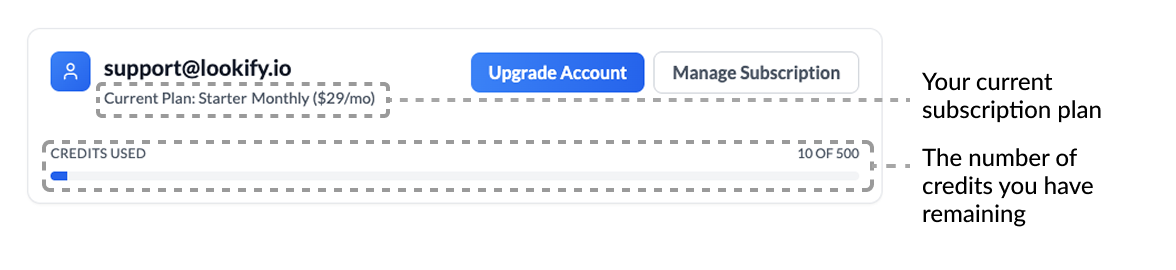
Below is an example of what the account overview card looks like in your account dashboard, showing your current plan, billing cycle, price, credit usage, and action buttons:
Need more credits?
If you find yourself consistently using all your credits before your renewal date, consider upgrading to a higher tier plan for better value or purchasing additional credit packs. You can check your renewal date in the billing portal.
View Plans & Pricing